Solution Whitepaper

Noted — Private, On-Device Meeting Transcription with AI Summaries and Speaker Identification

Meeting transcription has become a default expectation in modern workplaces. Distributed teams, hybrid work, and the sheer volume of synchronous communication…

Download as PDF: light · dark

The Problem

Meeting transcription has become a default expectation in modern workplaces. Distributed teams, hybrid work, and the sheer volume of synchronous communication — standups, client calls, strategy sessions, one-on-ones — generate hours of spoken content every day that organizations need to capture, summarize, and make actionable. The market for AI meeting assistants has grown accordingly, with tools like Otter.ai, Fireflies.ai, Granola, and Microsoft Copilot now embedded in millions of workflows.

Yet the dominant approach to meeting transcription carries a structural problem that most organizations have accepted as a cost of doing business: every word spoken in every meeting is transmitted to a third-party cloud for processing.

Consider what this means in practice. A law firm discussing litigation strategy, a healthcare team reviewing patient cases, a product team debating acquisition targets, a government contractor working through classified-adjacent material — all of this audio is streamed to servers operated by venture-backed startups or hyperscale cloud providers. The transcripts are stored, indexed, and in many cases used to train AI models. Even services that claim not to train on user data still require trust in their infrastructure, their employees, their compliance posture, and their future business decisions.

The consequences are measurable:

  • Compliance exposure. Organizations subject to GDPR, HIPAA, ITAR, SOC 2, or legal privilege obligations face real risk when meeting audio leaves their control. The obligation does not transfer to the vendor: the organization remains the controller of that audio, and must be able to say where it went and who processed it.
  • Security surface area. Every cloud transcription service is a target. Otter.ai disclosed a data breach in 2023; Zoom's AI training controversy in the same year led to policy reversals. Each integration adds an attack vector.
  • Vendor lock-in and recurring costs. Cloud transcription services charge per-seat, per-minute, or per-month fees that scale linearly with usage. A 50-person team on a typical enterprise plan pays $6,000–$15,000 annually for transcription alone — and loses access to all historical data if they cancel.
  • Network dependency. Cloud-based tools fail in exactly the scenarios where transcription matters most: off-site meetings with poor connectivity, classified environments with air-gapped networks, international travel with unreliable data connections.

Meanwhile, the hardware in modern laptops has fundamentally changed. Apple Silicon Macs ship with neural engines and unified memory architectures capable of running large language models and speech recognition models locally at speeds that were impossible three years ago. The gap between cloud and on-device AI quality has narrowed dramatically — Whisper-class models now achieve near-human transcription accuracy, and 7B-parameter language models produce summaries comparable to GPT-3.5-class outputs.

The market has not caught up. Most meeting transcription tools were architected in 2019–2021, when on-device inference was impractical. They are structurally cloud-dependent — not because cloud processing is better, but because it was the only option when they were built. Users are forced into a false tradeoff: professional-grade transcription or data privacy, but not both.


Solution Overview

Noted is a macOS application that delivers professional-grade meeting transcription, AI-powered summaries, speaker identification, and screen recording — with every computation running entirely on-device. No audio, text, or metadata ever leaves the user's Mac. There is no cloud service, no account creation, no telemetry, and no internet requirement.

The core architectural insight is that Apple Silicon's Neural Engine and Metal GPU, combined with optimized inference frameworks (WhisperKit for speech-to-text, Apple MLX for LLM inference, and WeSpeaker for speaker embeddings), can now deliver the full pipeline — capture, transcribe, diarize, summarize — locally, in real time, on hardware that knowledge workers already own.

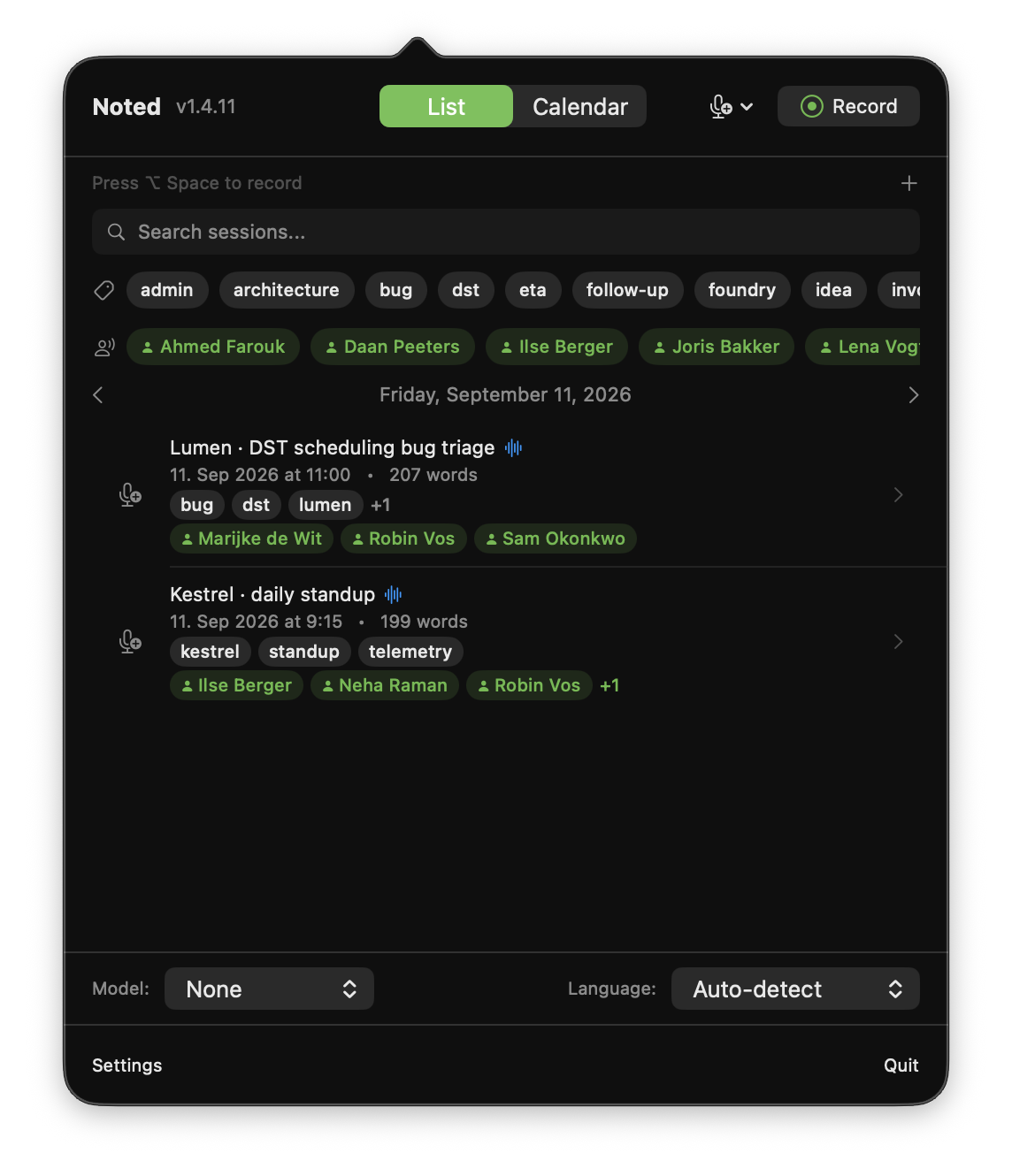
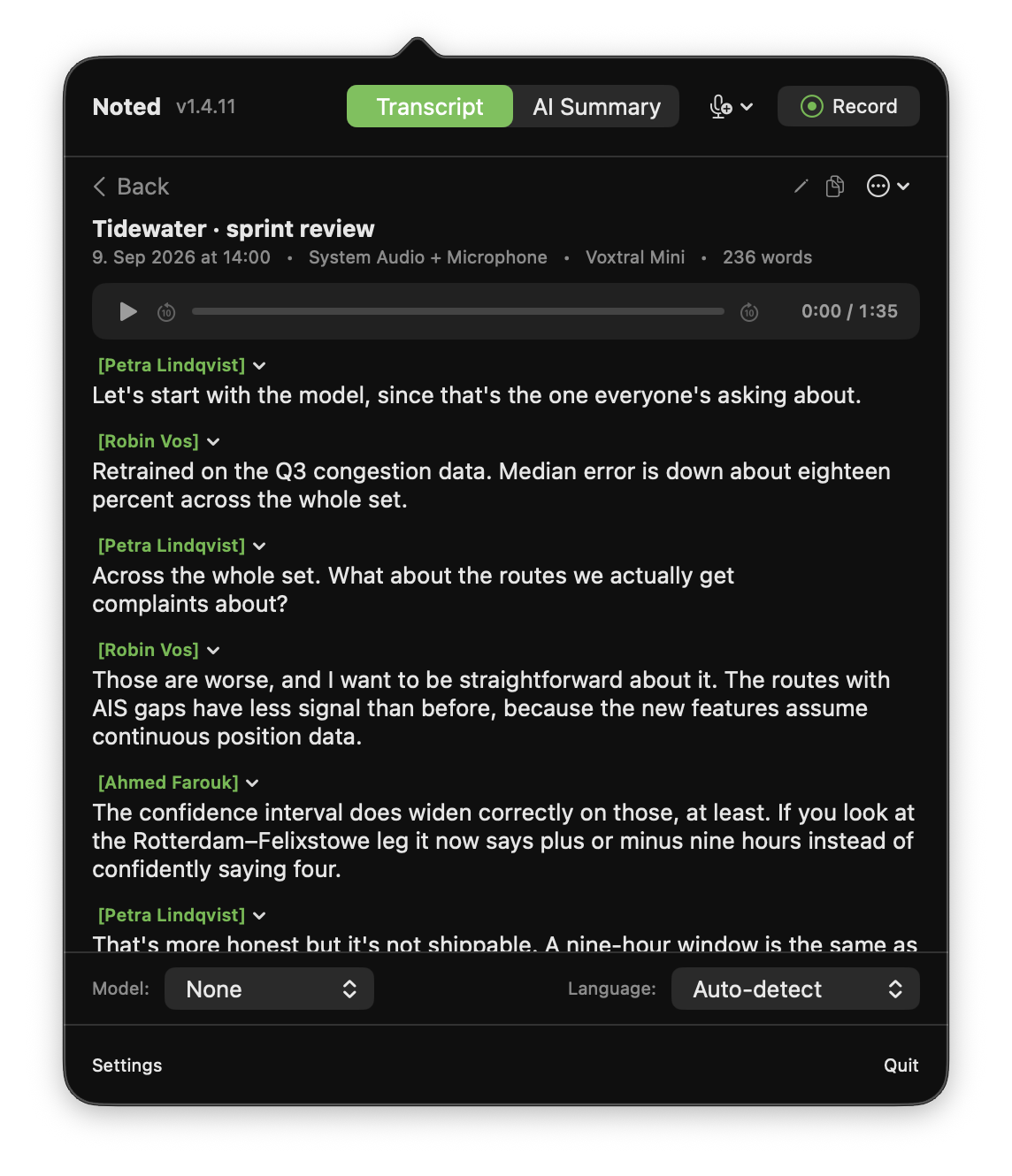
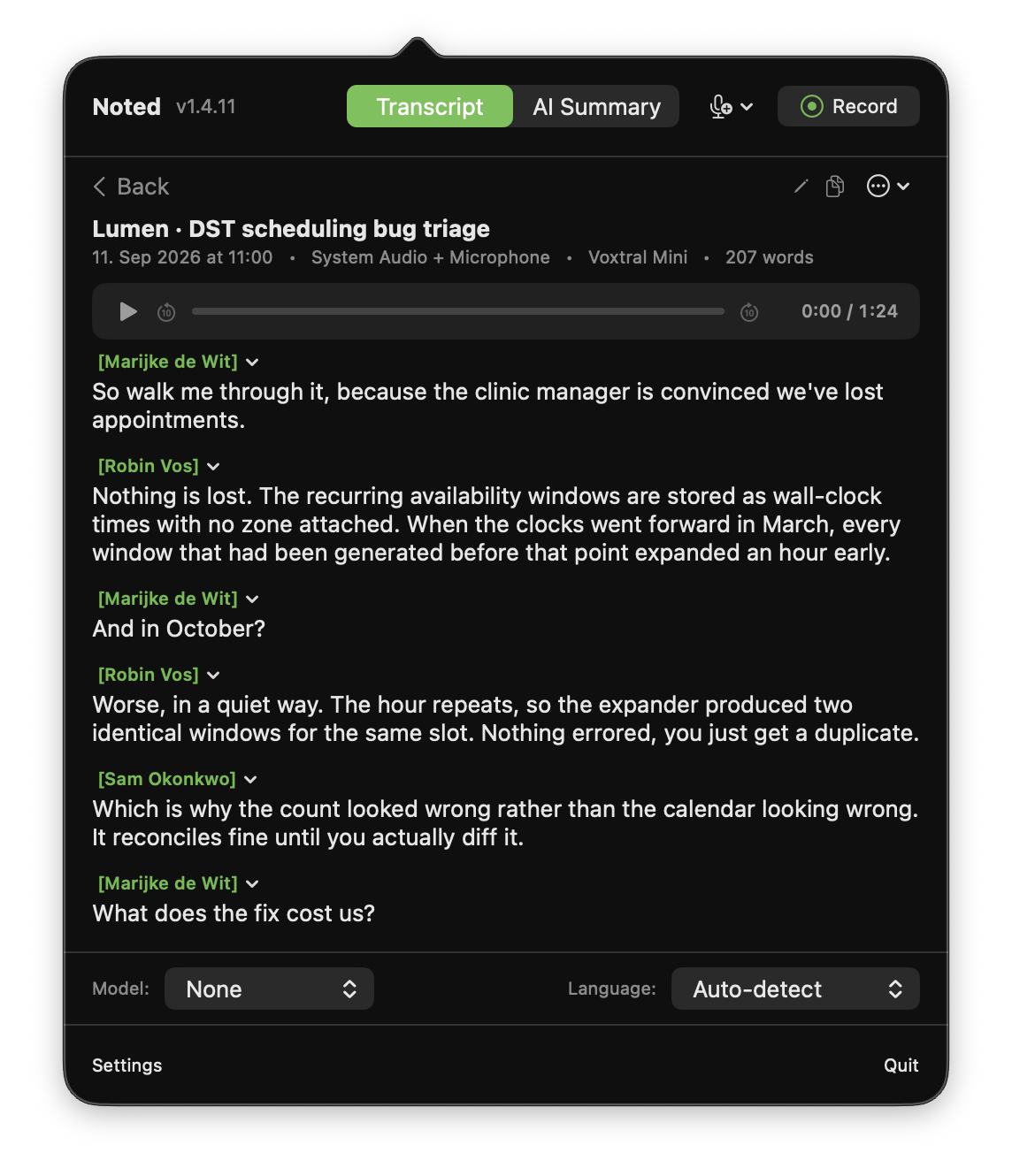
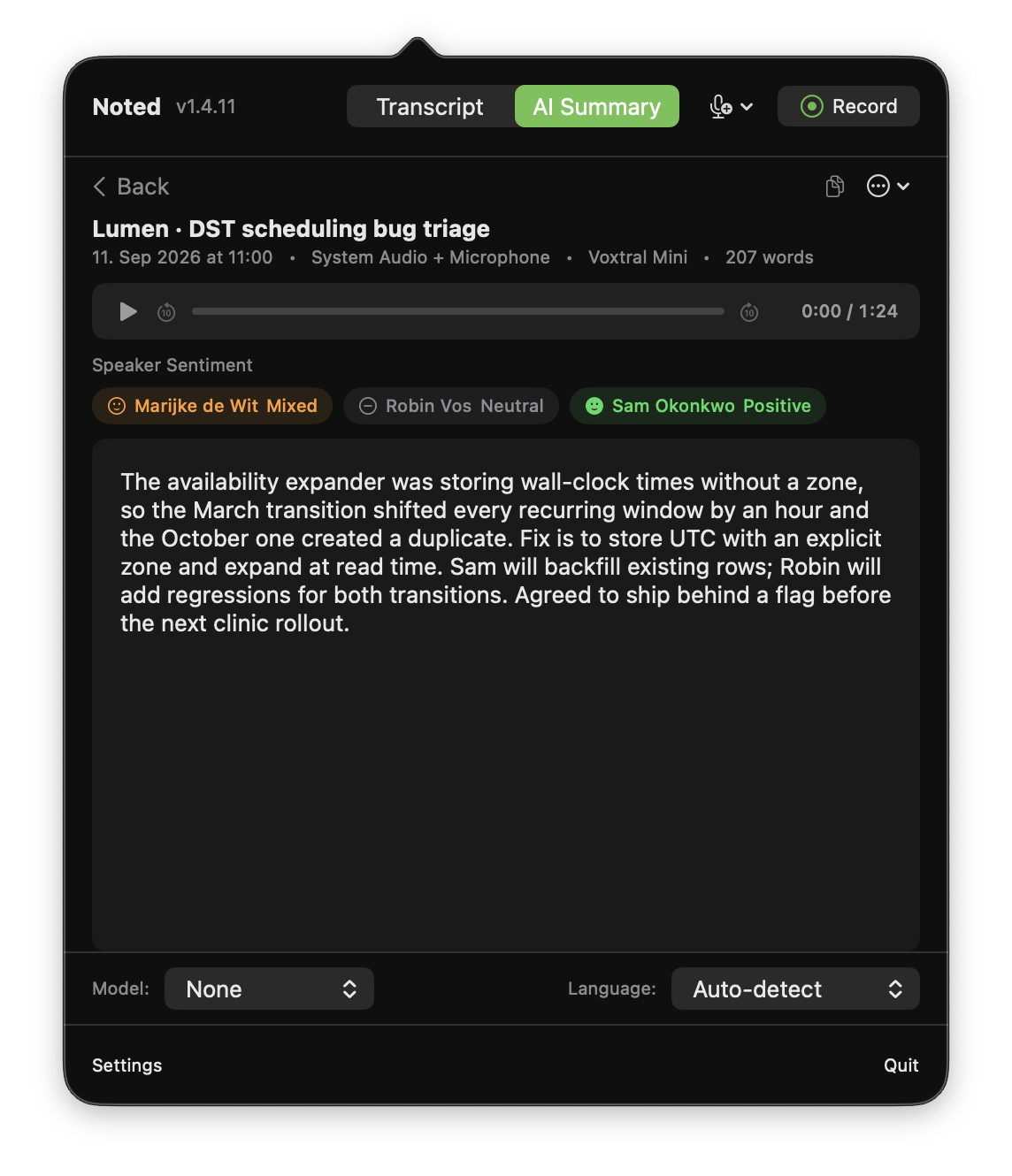
Noted runs as a menu bar application, designed to be always present but never intrusive. A single keyboard shortcut starts and stops recording. Live transcription appears in real time during the recording. When the recording ends, an on-device AI pipeline identifies speakers, generates structured summaries, assigns titles, and categorizes sessions with tags — all without any network request.

This design was driven by three specific product decisions, each addressing a pain point in existing tools:

  1. Privacy by architecture, not policy. Noted does not implement privacy through terms of service or compliance certifications. It implements privacy through the absence of network transmission. There is no server to breach, no data to subpoena from a third party, no training pipeline to opt out of. This is a qualitative difference from cloud tools that promise not to misuse data — Noted cannot misuse data because it never has access to it beyond the local machine.

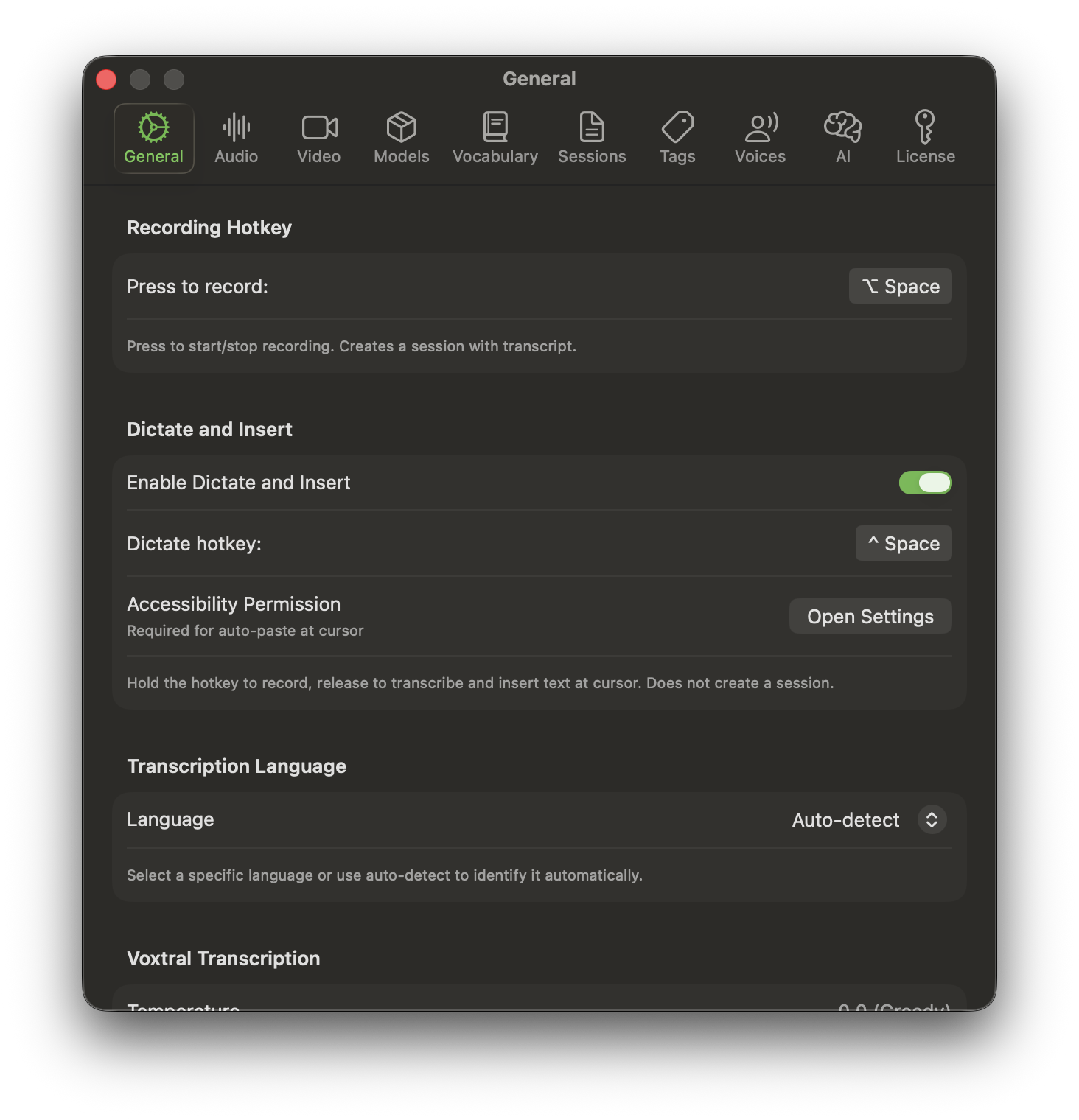
  2. Zero-friction capture. Meeting transcription tools that require joining a call, opening a browser tab, or configuring an integration create friction that leads to inconsistent adoption. Noted lives in the menu bar, activates with a global hotkey (Option+Space), and captures from any audio source — microphone, system audio, or both simultaneously. A separate dictation mode (Control+Space) enables ephemeral voice-to-text input into any application without creating a session.

  3. Full-featured without subscription dependency. Noted offers a one-time purchase option alongside subscriptions. All features are included in every plan. There are no per-minute charges, no seat limits, no usage caps, and no feature gates.

Noted is in production, available for download, and actively maintained with automatic updates via the Sparkle framework.


Key Capabilities

Transcription Engine: Voxtral and WhisperKit

Noted ships with two complementary transcription engines, giving users a choice between accuracy, speed, and model size.

Voxtral is Mistral AI's open-weights speech-to-text model, optimized for multilingual transcription. It runs on Apple Silicon via the MLX framework, using Metal GPU acceleration for inference. Voxtral provides state-of-the-art accuracy with automatic language detection across 99+ languages, making it the recommended engine for most use cases.

WhisperKit is an Apple-optimized implementation of OpenAI's Whisper, compiled to CoreML for native execution on the Neural Engine and GPU. Noted supports 10 WhisperKit model variants ranging from 40 MB (Tiny) to 3 GB (Large v3), including compressed and distilled variants that deliver near-large-model accuracy at a fraction of the size:

  • Large v3 Turbo Compressed (~632 MB): Large-model accuracy with a small download footprint — the best balance of quality and efficiency.
  • Distil Whisper Large v3 (~594 MB): A distilled variant optimized for speed while retaining high accuracy.
  • Large v3 Compressed (~626 MB): Full Large v3 accuracy in a compressed format.
  • Small English (~460 MB): English-only variant with optimized accuracy for single-language deployments.

Users can download and manage multiple models simultaneously, switching between them based on the demands of each session. Model downloads include progress tracking, and the system coordinates concurrent loads to prevent resource conflicts.

Custom fine-tuned models are also supported. Organizations that have fine-tuned Whisper for domain-specific vocabularies — medical terminology, legal language, proprietary product names — can import models directly from HuggingFace repositories or local folders. This enables specialized transcription accuracy without modifying the application.

Live transcription processes audio in approximately 5-second chunks during recording, providing near-real-time text output with waveform visualization in the floating recorder overlay.

Speaker Diarization and Voice Profiles

Noted identifies "who spoke when" using speaker embedding models from the FluidAudio/WeSpeaker framework (available on macOS 14.0+). The diarization pipeline:

  1. Extracts 256-dimensional speaker embeddings from audio segments.
  2. Clusters embeddings using configurable parameters: clustering threshold, minimum and maximum speaker count, and minimum segment duration.
  3. Assigns speaker labels to each transcript segment.

For recurring meeting participants, users can create voice profiles — named identities linked to stored voice samples and speaker embeddings. When a profiled speaker is detected in a subsequent recording, the transcript displays their name rather than a generic speaker ID. This transforms anonymous transcripts into attributed records suitable for meeting minutes, action item tracking, and accountability.

Voice profiles are stored locally alongside their audio samples, enabling refinement over time as more recordings capture each speaker's voice characteristics.

On-Device AI Summaries, Titles, and Tags

After a recording ends, Noted runs an on-device language model to generate three outputs:

  • Title: A concise (maximum 6-word) descriptive title for the session.
  • Summary: A structured summary beginning with a 2–3 sentence introduction, followed by bullet-pointed key topics, concluding with actionable items and to-dos identified in the discussion.
  • Tags: One or two categorization tags (lowercase, single words or hyphenated phrases) for organizing sessions.

The LLM runs locally via an embedded server using Apple's MLX framework, optimized for Apple Silicon inference. Users can choose from five supported models:

Model Size Use Case
Qwen 2.5 7B 4.3 GB Highest quality summaries
DeepSeek R1 7B 4.5 GB Strong reasoning capability
Llama 3.2 3B 1.7 GB Balanced quality and performance
Qwen 2.5 1.5B 938 MB Fast inference, compact
Llama 3.2 1B 876 MB Minimal resource usage

All prompts are customizable. Users can modify the system and user prompts for title, summary, and tag generation to match their organizational conventions or output language preferences. Summary output language can be set independently of the transcription language — enabling, for example, transcription of a Japanese meeting with an English summary.

Audio Capture: Microphone, System Audio, and Mixed Mode

Noted supports three audio capture modes:

  • Microphone recording: Captures from any connected input device with real-time waveform visualization.
  • System audio capture: Records audio output from the system or specific applications using ScreenCaptureKit (macOS 13.0+). This enables transcription of remote meetings, webinars, podcasts, or any audio playing on the Mac — without requiring a bot to join a call.
  • Mixed audio capture: Simultaneously records microphone and system audio, mixing them into a single stream. This captures both sides of a conversation — the user's voice from the microphone and remote participants from system audio.

This flexibility means Noted can transcribe in-person meetings, remote video calls, phone conversations, recorded lectures, or any combination — all from a single interface.

Large Room Mode: Advanced Audio Preprocessing

For users recording in lecture halls, auditoriums, or conference rooms where the speaker is far from the microphone, Noted includes a specialized audio preprocessing pipeline that dramatically improves transcription quality in challenging acoustic environments.

Large Room Mode activates a three-stage processing chain:

  1. High-pass filtering: A 2nd-order Butterworth biquad filter with an 80 Hz cutoff removes low-frequency noise (HVAC vibration, room rumble, foot traffic) below the human speech range.
  2. Spectral noise reduction: FFT-based spectral subtraction estimates the steady-state noise floor from quiet frames and subtracts it from the signal spectrum. This removes background fan hum, crowd murmur, and room tone while preserving speech. The algorithm uses 512-sample (32 ms) overlapping frames with Hann windowing and includes an over-subtraction factor (2.5x) with a spectral floor to prevent musical noise artifacts.
  3. Automatic gain control (AGC): RMS-based gain adjustment with asymmetric attack/release dynamics (10 ms attack, 300 ms release) boosts quiet distant speech to the amplitude range that transcription models are trained on, with a maximum gain of 30x (+29 dB).

Raw audio is always preserved for export and speaker diarization — only the transcription path receives preprocessed audio. The silence gate thresholds are automatically lowered when Large Room Mode is active (from 0.008 to 0.003 RMS) to prevent quiet distant speech from being gated out. The entire pipeline uses Apple's built-in Accelerate framework (vDSP) with no additional dependencies.

Screen Recording and Screenshots

Noted can record the primary display during a session using ScreenCaptureKit (macOS 13.0+), producing H.264 video with AAC audio. Configuration options include frame rate (15, 30, or 60 FPS), quality presets (low, medium, high bitrate), and cursor capture inclusion. Additionally, periodic screenshot capture at configurable intervals (10 seconds to 5 minutes) provides a visual timeline of what was on screen during a meeting.

Videos and screenshots are saved alongside session transcripts, creating a complete multimodal record of any meeting or work session.

Dictate and Insert

A separate interaction mode, activated by holding Control+Space, provides ephemeral voice-to-text dictation. The user holds the shortcut, speaks, and releases — the transcribed text is immediately inserted at the cursor position in whatever application is focused. No session is created, no audio is saved. This enables voice input into any text field on macOS: email composition, chat messages, code comments, document editing.

This requires the macOS Accessibility permission and uses keyboard event simulation to paste the transcribed text at the cursor location.

Multi-Language Support

Both transcription engines support 99+ languages with automatic language detection. Users can allow the engine to detect the spoken language automatically or manually select a specific language to bias recognition. The custom vocabulary feature allows users to specify domain-specific terms, proper names, and technical jargon that should be favored during transcription — improving accuracy for specialized content without model retraining.

Session Management and Export

Every recording is automatically saved as a session with timestamps, word counts, duration, speaker labels, AI-generated metadata, and associated media files. The session browser provides:

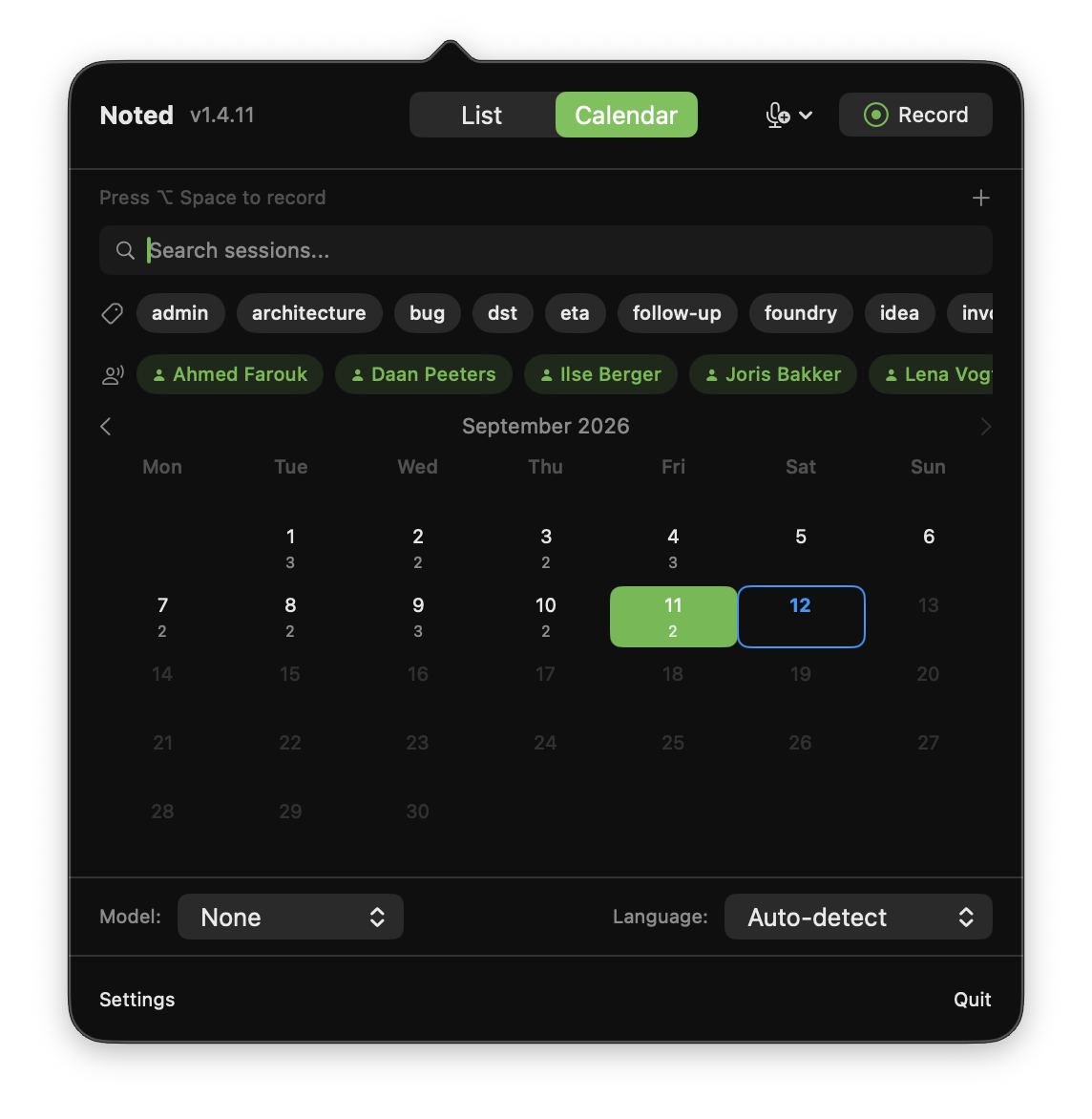
  • Calendar view: Browse sessions by date.
  • Full-text search: Search across session names, transcript content, and tags.
  • Tag filtering: Filter by multiple tags with AND logic (sessions must match all selected tags).
  • Manual sessions: Create sessions from typed or pasted text, with AI-generated titles, summaries, and tags.
  • Export: Copy to clipboard or export as Markdown, JSON, or plain text.
  • Auto-cleanup: Configurable automatic deletion of old sessions (7, 30, 90 days, or 1 year) with storage statistics.

Architecture and Technical Design

Architectural Philosophy

Noted is built on a principle of local-first computation with no fallback to cloud services. Every processing pipeline — audio capture, transcription, speaker diarization, LLM inference, video encoding — runs entirely within the macOS application process. This is not a hybrid architecture with optional cloud offloading; there is no network code for sending user data anywhere.

The application is written in Swift and SwiftUI, targeting macOS natively. It runs as a menu bar application (NSStatusItem with NSPopover hosting), with a translucent floating overlay window during active recording.

AI and ML Stack

The AI capabilities rely on three frameworks, each selected for a specific computational characteristic:

  • WhisperKit (CoreML): Speech-to-text models compiled to CoreML format for execution on Apple's Neural Engine. CoreML leverages the dedicated ML accelerator in Apple Silicon, enabling inference with minimal CPU and GPU load. WhisperKit handles model download, version management, and the CoreML inference pipeline.
  • MLX (Metal GPU): Apple's machine learning framework for Apple Silicon, used for Voxtral transcription and LLM inference. MLX provides NumPy-like APIs for GPU-accelerated tensor operations via Metal, with aggressive memory management via configurable GPU cache limits. The LLM server uses mlx-swift-lm for model loading and inference with an OpenAI-compatible local API.
  • FluidAudio/WeSpeaker: Speaker embedding extraction for diarization, producing 256-dimensional vectors for speaker clustering and identification.

A Metal pre-flight validation runs at application startup before any MLX code executes. This check uses safe Swift/Objective-C Metal APIs (MTLCreateSystemDefaultDevice, MTLDevice.makeLibrary) to verify GPU availability and metallib compatibility. If Metal is unavailable or the shader library is incompatible with the running macOS version, MLX-dependent features (LLM summaries, Voxtral transcription) are gracefully disabled with a user-facing alert, and the application falls back to WhisperKit-only operation.

Audio Pipeline

Audio capture uses AVFoundation for microphone input and ScreenCaptureKit for system audio. The audio pipeline splits into two paths: raw audio is preserved for M4A file export and speaker diarization, while a parallel path feeds through the optional Large Room Mode preprocessor before reaching the transcription engine. This separation ensures that preprocessing artifacts never affect the saved audio or speaker embedding quality.

The silence gate uses RMS-based energy detection to avoid feeding silent audio to the transcription engine, which would otherwise cause hallucinated output. Thresholds are automatically adjusted when Large Room Mode is active.

Data Storage and Privacy

All data — sessions, transcripts, audio files, video recordings, voice profiles, model weights, and configuration — is stored in the macOS application support directory. There is no database server; the application uses file-based storage with JSON serialization. No user account, authentication, or registration is required.

The application requests only three macOS permissions:

  • Microphone: Required for audio recording.
  • Screen Recording: Required for system audio capture and screen recording.
  • Accessibility: Optional, required only for the Dictate and Insert (paste-in-place) feature.

Update Mechanism

Automatic updates are delivered via the Sparkle framework using EdDSA-signed appcast feeds. Updates are checked automatically and can be applied without manual intervention.


Use Cases and Scenarios

1. Engineering Team Lead — Daily Standups and Sprint Planning

Context: A software engineering team of eight conducts daily standups and bi-weekly sprint planning sessions via a mix of in-person and hybrid meetings.

Challenge: The team lead needs accurate records of commitments, blockers, and action items — but manual note-taking during facilitation is impractical, and the company's security policy prohibits sending meeting audio to third-party cloud services.

How Noted addresses it: The team lead activates Noted with Option+Space at the start of each meeting, using mixed audio capture to record both the conference room microphone and remote participants via system audio. Voice profiles for all eight team members are pre-configured, so the transcript shows each person's name. After the meeting, the on-device LLM generates a structured summary with action items listed at the end. The lead exports the summary as Markdown and pastes it into the team's internal wiki. Tag filtering allows quick retrieval of all "sprint-planning" sessions when preparing quarterly reviews.

Outcome: Complete, attributed meeting records with zero data leaving the company's machines. No per-seat subscription cost for the team.

2. Healthcare Professional — Patient Consultation Notes

Context: A physician in a private practice conducts patient consultations and needs to document key discussion points for medical records.

Challenge: HIPAA compliance prohibits transmitting patient health information to unauthorized third parties. Cloud-based transcription services require Business Associate Agreements and introduce compliance risk that the practice's legal counsel has flagged.

How Noted addresses it: The physician uses Noted with a desk microphone during consultations. Transcription runs entirely on-device — no PHI leaves the room. After each appointment, the AI summary extracts the key medical discussion points, which the physician reviews and transfers to the EHR system. Auto-cleanup is configured to delete sessions after 7 days, ensuring transcripts do not accumulate on the laptop.

Outcome: Structured consultation notes generated in seconds, with zero cloud exposure of patient data and full HIPAA compliance by architectural design.

3. University Student — Lecture Capture in Large Auditoriums

Context: A graduate student records lectures in a 300-seat auditorium where the professor speaks from a podium 15 meters from the student's seat.

Challenge: Standard transcription fails because the speech signal is weak, background noise from HVAC and other students is prominent, and the default silence detection gates out the professor's distant voice entirely.

How Noted addresses it: The student enables Large Room Mode in Settings > Audio before the lecture. The three-stage preprocessing pipeline — high-pass filtering to remove sub-80 Hz room rumble, FFT-based spectral noise reduction to suppress HVAC hum and crowd murmur, and automatic gain control boosting the weak speech signal by up to 29 dB — delivers clean audio to the transcription engine. The lowered silence gate thresholds (0.003 RMS) ensure quiet distant speech is not discarded. After the lecture, the AI generates a structured summary with key topics as bullet points and tags for later filtering.

Outcome: Accurate transcripts of lectures that previously produced unusable output, with no special hardware required beyond the laptop's built-in microphone.

4. Legal Professional — Client Intake and Deposition Review

Context: An attorney at a mid-size firm conducts client intake interviews and reviews recorded depositions.

Challenge: Attorney-client privilege requires that no third party have access to conversation content. Cloud transcription services, regardless of their security posture, introduce a third party into privileged communications.

How Noted addresses it: For intake interviews, the attorney records directly via microphone. For deposition review, system audio capture transcribes playback of recorded audio files. Speaker diarization identifies and labels each participant. The custom vocabulary feature is configured with case-specific legal terminology and proper names to improve transcription accuracy. Sessions are tagged by case number and exported as JSON for integration with the firm's document management system.

Outcome: Complete, searchable transcripts of privileged communications that never leave the attorney's Mac, with speaker attribution suitable for formal records.

5. Product Manager — Cross-Functional Strategy Sessions

Context: A product manager at a technology company leads weekly strategy sessions with stakeholders from engineering, design, sales, and customer success — often with participants joining remotely.

Challenge: These meetings generate critical decisions about roadmap, pricing, and competitive positioning that should not be accessible to cloud service providers. The PM also needs to quickly reference specific discussions weeks later during planning cycles.

How Noted addresses it: Mixed audio capture records both in-room and remote participants. Screen recording captures the shared slide deck and demo walkthroughs alongside the transcript, creating a complete multimodal record. Voice profiles identify regular attendees by name. After the session, the PM uses the calendar view to browse sessions by date and full-text search to find specific discussions ("Who mentioned the enterprise pricing concern in the Q4 review?"). Markdown export produces formatted meeting notes for stakeholder distribution.

Outcome: Searchable, attributed, multimodal meeting records with visual context — generated without any manual note-taking and without data leaving the organization.

6. Freelance Consultant — Multilingual Client Engagements

Context: An independent consultant works with clients across Europe, conducting meetings in English, German, and French, often within the same week.

Challenge: Maintaining accurate records across languages without paying for multiple per-language transcription subscriptions. Cloud tools often require manual language selection and handle code-switching poorly.

How Noted addresses it: Automatic language detection identifies the meeting language without manual configuration. The consultant configures AI summary output in English regardless of the meeting language, creating a standardized record across all engagements. The Dictate and Insert feature enables quick follow-up email drafting in any language by holding Control+Space and dictating directly into the email client. The lifetime purchase option eliminates recurring subscription costs — a significant consideration for an independent contractor managing expenses.

Outcome: Consistent, multilingual meeting documentation across all client engagements at a one-time cost, with no language-specific configuration required.


Pricing and Plans

Noted follows a transparent pricing model with no feature differentiation between plans. Every plan includes every capability — unlimited recordings, all transcription models, AI summaries, speaker diarization, screen recording, and all supported languages. The only variable is the billing structure.

Plan Price Billing Included
Buy Once €149 One-time payment All features, all v1.x updates
Monthly €10/month Monthly subscription All features, cancel anytime
Yearly €8/month (€96/year) Annual subscription All features, save 20% vs. monthly
Enterprise Custom Custom Volume licensing, custom deployment, dedicated support, priority feature requests

The pricing philosophy is straightforward: the software runs entirely on the user's hardware, consuming no server resources, so there is no marginal cost per user that justifies usage-based pricing. The Buy Once option (labeled "Best Value") provides permanent ownership of the current major version at a price equivalent to 15 months of the monthly subscription. Enterprise inquiries are handled directly via support for volume licensing and custom requirements.


Frequently Asked Questions

Does Noted require an internet connection to function?

No. All transcription, speaker diarization, AI summary generation, and screen recording run entirely on-device using models stored locally on the Mac. An internet connection is only needed for two optional operations: downloading transcription and LLM models when first setting up the application, and checking for application updates. Once models are downloaded, Noted operates fully offline.

What are the system requirements?

Noted requires macOS 11.0 or later for basic transcription. System audio capture and screen recording require macOS 13.0+. Speaker diarization requires macOS 14.0+. LLM-powered AI features (summaries, titles, tags) require Apple Silicon. Intel Macs are supported for transcription only via WhisperKit CoreML models. The application is optimized for Apple Silicon's Neural Engine, Metal GPU, and unified memory architecture.

How does Noted handle meetings with remote participants?

System audio capture allows Noted to transcribe any audio playing on the Mac — including remote meeting participants speaking through Zoom, Teams, Google Meet, or any other conferencing application. Mixed audio mode captures both the user's microphone and system audio simultaneously, producing a transcript of the complete conversation from both sides.

Can I use custom or fine-tuned transcription models?

Yes. Noted supports importing custom WhisperKit-compatible models from HuggingFace repositories or local folders. Organizations that have fine-tuned Whisper for domain-specific vocabularies (medical, legal, technical) can add these models through the Settings interface. The application validates model compatibility and manages downloads with progress tracking.

What happens to my data if I stop my subscription?

All session data — transcripts, audio recordings, video files, voice profiles, and AI summaries — is stored locally on the Mac in standard file formats. This data is always accessible regardless of subscription status. Exported Markdown, JSON, and plain text files are standard formats with no proprietary encoding. There is no vendor lock-in on data.

Is a trial available?

Noted can be downloaded directly from the website. Pricing details and purchase options are available at the product website.


Why Amsterdam Technologies

Noted reflects Amsterdam Technologies' engineering philosophy: solve real problems with thoughtful architecture, prioritize user agency over vendor dependency, and ship production-quality software that respects both its users and their data.

The decision to build meeting transcription as an entirely on-device application was not a marketing positioning exercise. It was an architectural commitment that shaped every technical choice — from the selection of MLX and WhisperKit over cloud APIs, to the FFT-based audio preprocessing pipeline that replaces cloud-side noise reduction, to the embedded LLM server that eliminates the need for API calls. The result is software that cannot leak data, cannot be disrupted by a service outage, and cannot impose escalating per-seat costs on growing teams.

Amsterdam Technologies, headquartered in Amsterdam, Netherlands, maintains a portfolio of productivity, developer, and infrastructure tools built with the same principles. Each product is designed to function independently, with local-first data ownership and transparent pricing.

Noted is actively developed with a forward-looking roadmap that includes an iOS companion app (leveraging a shared Swift package architecture for code reuse across platforms), expanded model support including community fine-tuned models, and continued optimization of the on-device AI pipeline as Apple Silicon hardware capabilities advance.